Oslo · Portfolio agent
Explore the work. Ask about the decisions.
Oslo is the AI guide inside UX Terrain. Visitors can ask about a case study, follow references to the evidence, or choose a short walkthrough. The focus is a conversation that stays grounded in the work and gives the visitor control.
Help visitors ask about the work
A case study can explain a project without answering every question a visitor brings to it. Oslo gives hiring managers, design leaders, and peers a way to ask about the decisions, inspect the supporting material, and choose where to go next. The design challenge is making that conversation useful without turning missing information into a convincing story.
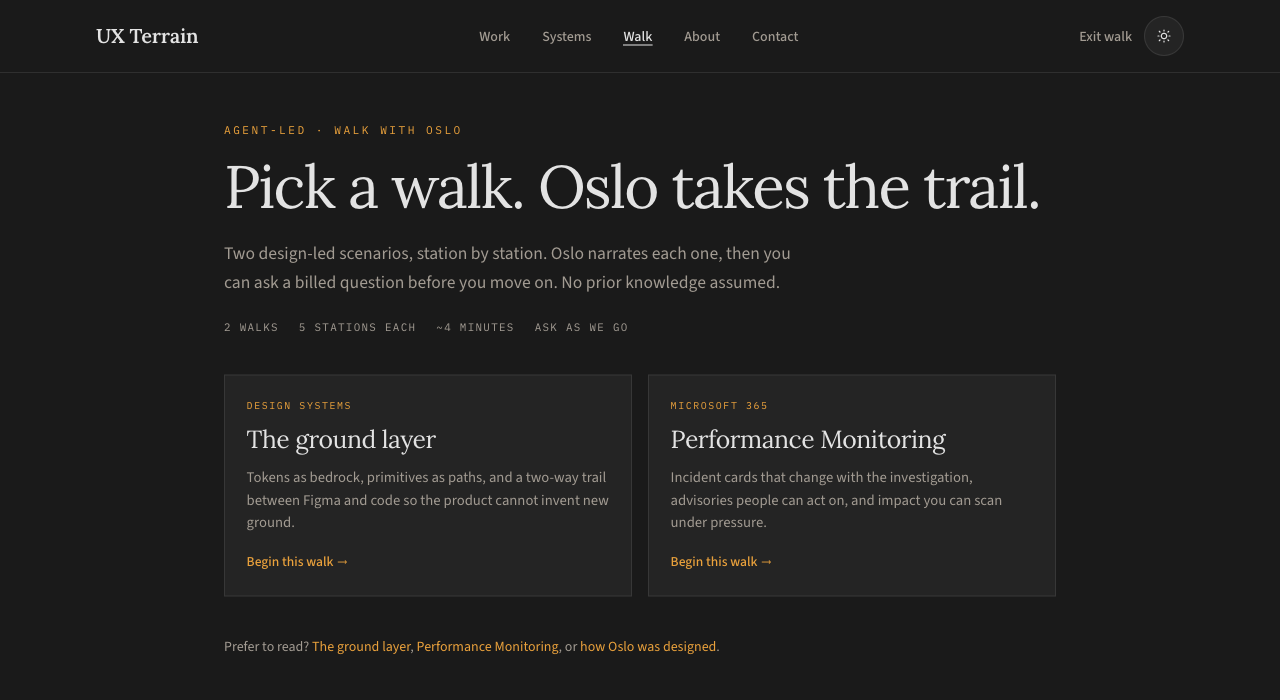
Two ways into the same material
Ask Oslo starts from the visitor’s question. It uses the current case study as context and offers questions about decisions, tradeoffs, and outcomes. Walk with Oslo starts from an authored sequence: one visual, one explanation, two questions, then a choice to continue.
- 01
Ask
Start with a question about the case you are reading.
- 02
Inspect
Follow an evidence link to the supporting section.
- 03
Walk
Choose a guided route when you want an introduction.
- 04
Continue
The visitor decides when to move to another station.
Make the status of an answer visible
The current answer design separates three kinds of statement: what the case documents, an interpretation of a design choice, and information the case does not provide. Evidence references open named sections of the portfolio. The server resolves those links from known source IDs, keeping the destinations under the site’s control.
This distinction matters most for hard questions. A tradeoff can be a useful interpretation without being the designer’s documented rationale. A missing measurement should remain a gap rather than become an invented result.
Keep the conversation in context
The panel identifies the current project. A walk sends a project and station identifier, which the server resolves to the authored station content. Temporary follow-up context supports questions such as “Why that approach?” without treating earlier answers as evidence. Follow-up context is bounded to three exchanges per project or station. While Oslo is open, source navigation keeps the discussion, draft, and panel position in the same browser tab. Closing Oslo ends automatic continuation across pages.
Design the pacing of a walk
The two Oslo walks each have five authored stations. A station pairs its visual with a short script and two suggested questions. Back, Next, and station selection remain visitor controls; an answer does not automatically advance the walk. This keeps the introduction predictable while leaving room to question a decision.
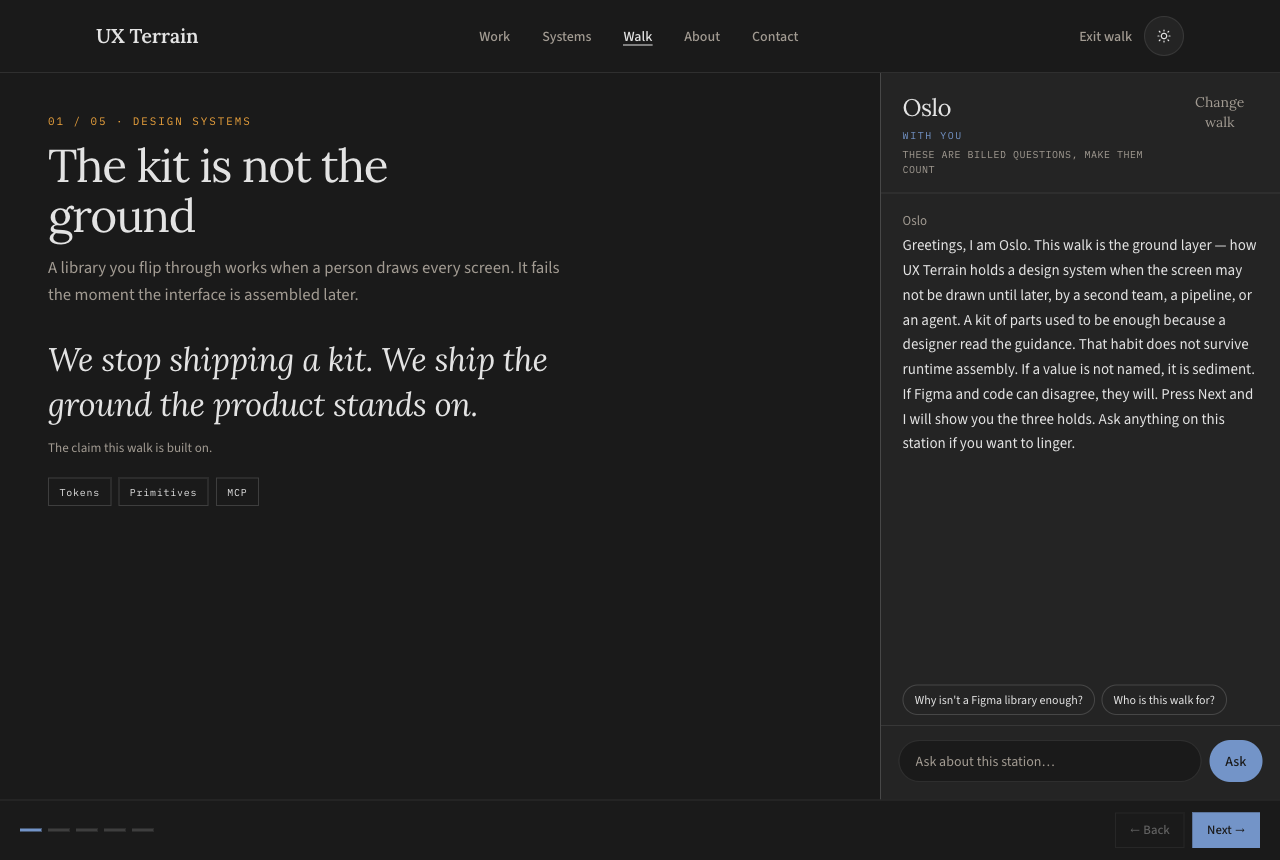
Define what happens between stations
The walk needed more than Back and Next. I defined the moments when a visitor might pause: question a decision, inspect its evidence, explore another example, or connect the approach to their own team. Each interaction needed a clear purpose and a destination that fulfilled its label.
Reviewing the working experience exposed a mismatch: “Talk about your system” appeared beneath an answer as supporting evidence, then opened a contact invitation. Keeping the panel open preserved the conversation, but the destination still interrupted the showcase. The review led to a clearer distinction between evidence, conversation, and an optional next step.
The current player opens supporting sections inside the walk and restores the station when the visitor returns. Answered suggestions become relevant follow-ups, while failed requests remain available to retry. The next refinement is to exclude contact invitations from evidence and offer “Apply this to your team” at the end. That closing experience is a design decision still to implement.
Question the decision
Continue the discussion in Oslo. Replace a successfully answered prompt with a relevant follow-up.
Inspect the evidence
Show the named supporting section in the main viewing area. Keep the conversation and a return to the same station.
Choose another example
Make a change of walk explicit so the visitor knows they are starting a different route.
Apply it to your team
Reserve the invitation for the end of the showcase. Let the visitor choose whether to continue, explore another walk, or discuss their situation.
A useful failure changed the answer design
In an early test, Oslo suggested that incident cards sacrificed historical context, even though the Performance Monitoring case includes historic timelines. The response had references, but its interpretation still overreached. That exposed a limitation: a valid source link does not prove that a conclusion follows from it.
The current version adds an evidence-review pass before displaying an answer and a source-linked correction for that known mistake. These are improvements to the procedure, not proof that every generated answer is correct. The content still needs evaluation across a wider range of questions.
How the current implementation works
The sidebar and guided walk share a chat endpoint. For current Oslo answers, the server selects published case-study evidence and trusted station content, prepares a draft, and requests an evidence review. It then validates the returned source IDs and sends a structured answer for the interface to display.
The current Oslo response appears after that review rather than streaming token by token. A waiting indicator keeps the request visible. While it is pending, the question controls are disabled. The API key stays on the server. Eda and the older text-response format retain their separate response behavior.
What I designed
The product concept and two entry points; the authored walkthrough structure; the prompts and scope; project and station context; the answer categories and evidence navigation; and the interaction states for waiting, follow-ups, and errors. The work connects the written guidance to what a visitor can actually see and control.
Keep evaluating the conversation
Automated checks cover source destinations, invalid context, unsupported reference IDs, and response compatibility. Conversation checks also need human review: did the answer address the question, use the whole case, distinguish interpretation from fact, and acknowledge what was missing? Those are the next quality questions for Oslo.
The product goal is a portfolio that helps people understand and question the work. The case studies remain the evidence; the agent helps visitors find their way through them.
Design-system context
This work used a custom design system designed from the ground up. It provided a shared foundation for the interface rather than treating each screen as an isolated design.